For anyone who follows live events on a phone—whether that means tracking a city street feed, checking a match while commuting, or monitoring a stream setup on the move—browser updates that surface live information without extra app-hopping are worth a look. Opera’s latest Android release does exactly that, adding a soccer hub timed to major World Cup coverage and pairing it with a refreshed start page designed to make news, search, and shortcuts easier to reach.
The headline feature is a dedicated soccer hub inside Opera for Android. It gathers football-focused news, scores, and match coverage in one place, giving users a way to keep up with World Cup developments without leaving the browser. For live-event watchers, that matters because the browser can become a single checkpoint for fast updates rather than another destination added to an already crowded phone.
That kind of built-in content layer is increasingly common across mobile browsers. Vendors want to keep users inside their apps longer by blending search, headlines, and topic hubs into the first screen people see. For camera operators and stream viewers, the pattern is familiar: the fastest route to timely information often wins, especially during travel, event days, and other moments when switching between apps is inconvenient.
What Opera added on Android
Opera says the update introduces a soccer hub geared toward World Cup coverage. The hub is meant to act as a live destination for football news and scores, so users can follow matches and tournament developments from within the browser interface.
For readers who already monitor live feeds, the appeal is straightforward. A browser that bundles current events can serve as a lightweight companion for checking headlines around a match, a fan zone, or a city event without opening a separate sports app. That is especially useful when the phone is doing double duty as a camera monitor, a travel guide, and a news feed.
A refreshed start page for quicker navigation
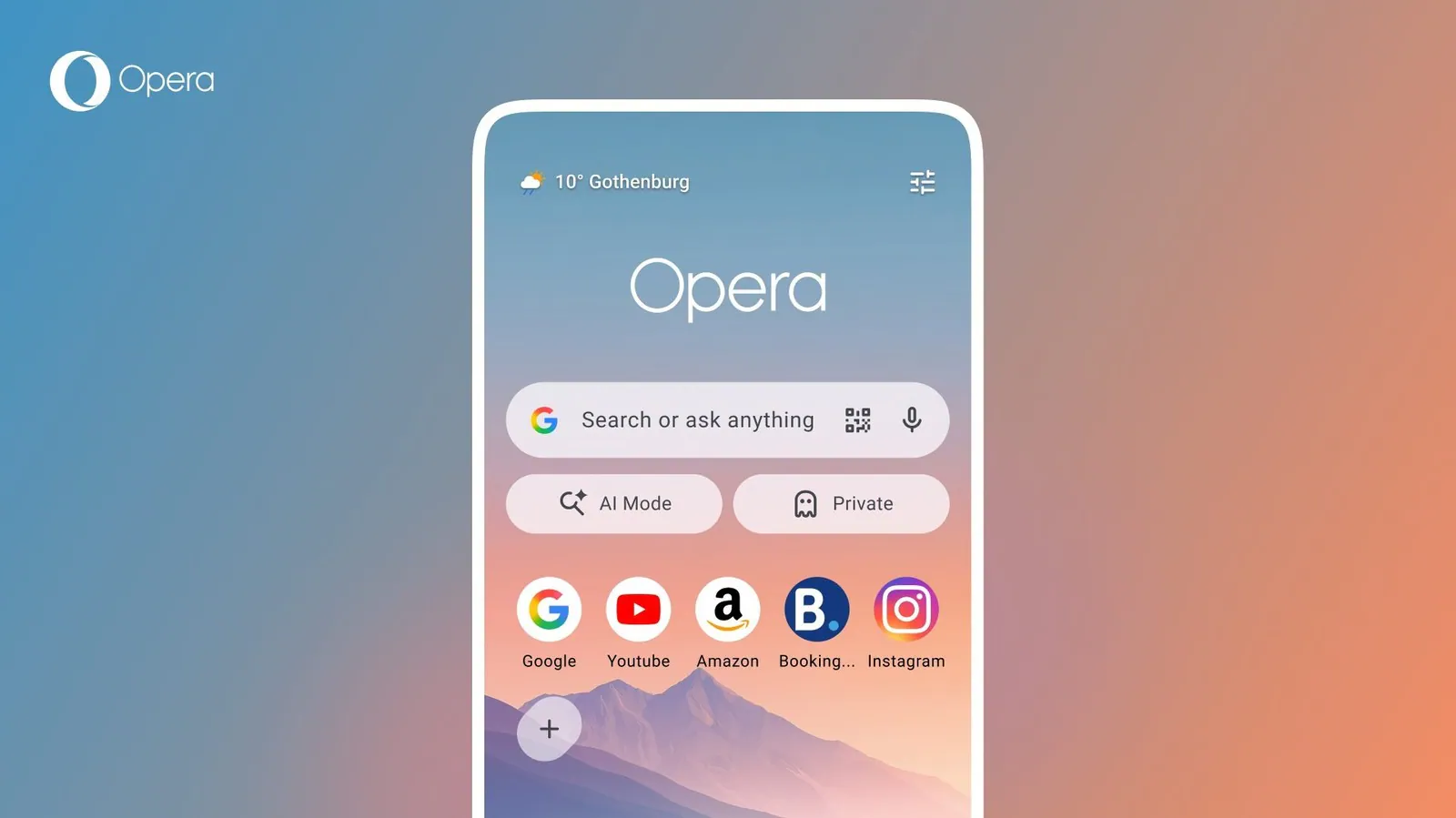
Opera also redesigned the Android start page. The new layout reorganizes access to news, search, and shortcuts so users can get to common actions faster when the browser opens.
That kind of cleanup can matter more than a flashy feature for mobile users who rely on the browser as a utility. A better start page reduces taps, which helps when checking a live webcam, looking up a venue, or jumping between a map and a feed while on the move.
For audiences that follow public cameras, a more efficient browser front end can be a practical gain. Opening pages like the live Abbey Road crossing cam in London or the 9 de Julio street cam in Buenos Aires is often part of a quick check-in rather than a long browsing session, so speed and clarity at launch are part of the experience.
Why this matters for live-camera and stream audiences
Browser makers increasingly package discovery features around live moments, from sports to breaking news to location-based content. That keeps the browser relevant when users want immediate context rather than a blank search box.
For Volve Vision’s audience, the overlap is easy to see. Readers who follow webcams, city feeds, or live-streaming setups often care about events that unfold in real time, and those same users are usually navigating the web on mobile while traveling or moving between locations. A browser that foregrounds news and fast links can be a better fit for that workflow than a minimalist homepage.
There is also a broader link to live coverage culture. During major events, people move between official scores, social updates, public cameras, and stream pages. If a browser makes those transitions smoother, it becomes part of the live-monitoring stack in the same way a dashboard or multiview app does.
That is why updates like this are relevant beyond sports fans. A cleaner start page can make it easier to jump to a stream, check a headline, or revisit a saved camera feed such as the Kyiv test construction cam or the live street view cam in Davao City when fast context matters more than deep browsing.
How it fits into the mobile browser race
Opera is not alone in trying to turn the browser into a content hub. Across Android, browsers keep adding curated feeds, sports surfaces, and shortcut layers because they help lock in daily use. The logic is simple: if the browser can surface timely content from the home screen, users may spend less time searching elsewhere.
For people who manage live camera pages or run streams, that trend can affect discovery too. A browser that prioritizes topical content may surface more of the pages and updates people want during live events, especially when they are scanning for real-time information on a phone instead of a desktop.
What to watch next
Opera’s update is aimed at Android users now, with the soccer hub positioned around World Cup coverage and the start page refresh focused on everyday usability. The remaining question is whether the company extends the same event-driven approach to other platforms or folds in more live-topic hubs over time.
For readers in our niche, the next thing to watch is whether browsers keep turning live events into first-screen features for mobile viewers, streamers, and public-camera watchers.